FAQs
In addition to the below FAQ's, you can find dozens of additional support articles and hundreds of customer questions and receive answers from other members of the community at support.inkedibles.com.

- What is edible ink?
- What is edible ink made of, and is it safe?
- How do you refill edible ink cartridges?
- What is the Inkedibles printhead cleaning solution and how is it used?
- What are frosting sheets and how do they work?
- How does edible ink printing work?
- What printers can be used with edible inkjet printing?
- Why choose the Inkedibles brand?
- What is Direct to Food Printing?
- What are the best printer settings to use for printing with Inkedibles?
- What are edible ink markers?
- How does Chocolate Transfer work?
- I have another question, how can I get support?
1. What is edible ink?
Edible ink is essentially edible coloring that is formulated and engineered
in a food grade laboratory to have the necessary characteristics (viscocity, droplet size, charge etc) in order to be jetted through an inkjet printer in a way that allows digital images
to be printed onto edible paper, also known as frosting sheets or wafer sheets. Edible ink
printing allows cake decorators to inexpensively produce digital
images from customer photos or other designs in a way that can be applied
to a cake. The way this works is that the cartridges of the printer (food grade cartridge containers) are
filled with edible ink, and this edible ink gets jetted onto the edible paper
(frosting sheets) as they flow through the printer. The printer does not know
that it is using edible ink as opposed to regular ink, and it does not know
that it is being fed with edible paper (frosting sheets) as opposed to regular
paper. What comes out of the printer is an image that is fully edible - both
the sheet on which it is printed, and the ink which is used to generate the
image. The frosting sheet is then applied onto a cake that is layered with
frosting, and the frosting sheet absorbs into the cake frosting in a way that
leaves the image beautifully pasted onto the cake and amazes customers and
friends. Edible ink should be used in the manner described above, for food
decoration purposes only.
InkEdibles also offers an innovative edible ink printing technology, whereby edible ink can be jetted directly to food, bypassing the need for edible paper. This technology is encompassed by our Direct to Food CakePro series printers, which are capable of printing directly to food (such as cakes, cookies, macarons, marshmallows, and more).
2. What is edible ink made of, and is it safe to
eat?
As long as the edible ink you use is being made by a trusted manufacturer,
is FDA compliant and made in a licensed food facility, it is safe to use as directed
- essentially it is a food coloring agent that is jetted to edible paper using an inkjet printer.
Inkedibles ™ brand edible inks are manufactured under stringent food safety and quality control conditions and are 100% FDA compliant. Our edible inks are a proprietary formulation of water, glycerin, ethanol, preservative and FDA approved colorants, that are formulated and engineered to flow through certain inkjet printers such as Canon or Epson machines, but they are not affiliated with these companies. They are are made in accordance with the FDA Code of Federal Regulations - 21CFR.
The nutritional information for Inkedibles ™ edible inks for (pursuant to 21CFR 101 of the FDA) and based on 100grams (3.5 oz) of Inkedibles ™ edible ink is listed here (% of daily volume based on a 2000 calories diet):
- Energy: 110 kcal / 6%
- Carbohydrates: 15grams / 1%
- Sodium: 260mg / 11%
- Proteins: 0
- Sugars: 0
- Dietary Fiber: 0
- Total Fat: 0
- Vitamin A: 0
- Vitamin C: 0
- Calcium: 0
- Iron: 0
The ingredients are as follows:
Edible Inks for Canon:
Color: Black
FD&C Red #3 food coloring less than 1%
FD&C Blue #1 (E133) food coloring less than 1%
FD&C Yellow #5 (E102) food coloring less than 1%
Water 93%, Alcohol (E1510) 3%, Propylene Glycol
(E1530)3%, Polysorbate 20 (E432) less than .01%
Color: Cyan
FD&C Blue #1 (E133) food coloring less than 1%
Water 93%, Alcohol (E1510) 3%, Propylene Glycol
(E1530)3%, Polysorbate 20 (E432) less than .01%
Color: Magenta
FD&C Red #3 (E129) food coloring less than 1%
Water 93%, Alcohol (E1510) 3%, Propylene Glycol
(E1530)3%, Polysorbate 20 (E432) less than .01%
Color: Yellow
FD&C Yellow #5 (E102) food coloring less than 1%
FD&C Red #3 (E129) food coloring less than 1%
Water 93%, Alcohol (E1510) 3%, Propylene Glycol
(E1530)3%, Polysorbate 20 (E432) less than .01%
Edible Inks for Epson:
Color: Black
Ingredients: water, ethanol, humectant:
glycerin, Red 40, Blue 1, polysorbate 80,
Red 3, Yellow 5.
May contain traces of soy and milk.
Color: Cyan
Ingredients: water, ethanol, humectant:
glycerin, Blue 1, polysorbate 80.
May contain traces of soy and milk.
Color: Magenta
water, ethanol, humectant:
glycerin, Red 3, polysorbate 80, Red 40,
Blue 1
May contain traces of soy and milk.
Color: Yellow
water, ethanol, humectant:
glycerin, Yellow 5, polysorbate 80.
May contain traces of soy and milk.
3. How do you refill edible ink cartridges?
Edible ink cartridges are essentially food grade plastic "containers" that are made in the shape
and form of an inkjet cartridge that plugs in your dedicated edible ink printer.
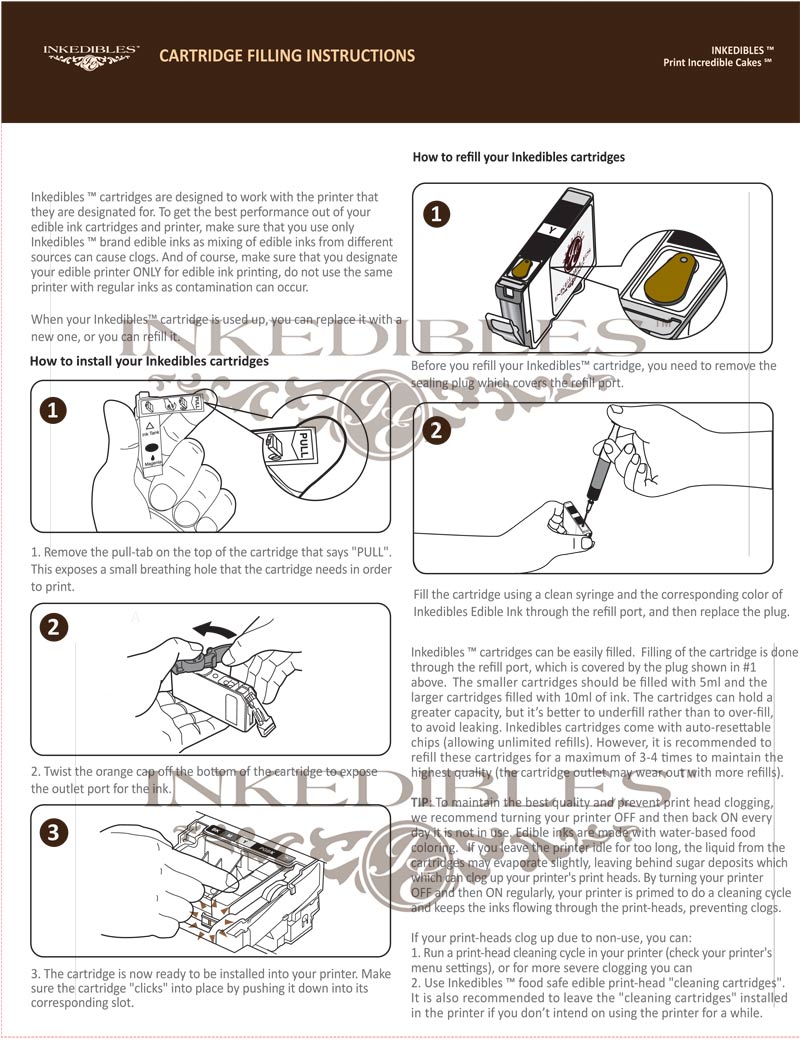
Inkedibles ™ cartridges are made with food grade plastics and are filled in licensed food facilities with FDA compliant edible ink. Whenever possible, the Inkedibles ™ cartridges are refillable and come with auto-resetting chips to ensure that your printer can continue to accept them after refilling. It is advised to clean your printheads using food grade cleaning solution (InkEdibles Food Grade printhead cleaning solution) between uses, and to not reuse the same edible ink cartridge more than 2 times.
Inkedibles cartridges have easy to fill refill ports. Simply remove the plug from the refill port, and inject Inkedibles refill ink which is sold in refill bottles.
(click to enlarge)
4. What is the Inkedibles printhead cleaning solution
and how is it used?
The Inkedibles printhead cleaning solution is a proprietary food safe formulation
that is used to clean your printer's printheads if they become clogged, and also used to clean and maintain your printheads. Printheads
can clog due to non-use of a printer - leaving a printer idle, especially
when you have edible cartridges installed, can cause the water from the ink
droplets which accumulate at the heads to evaporate, leaving behind crystalline
(sugar) deposits which can clog the print heads. The way to avoid this problem,
is to ensure that you print at least 1-2 pages with your printer per week,
and if you are going to leave the printer out of use for a while, to ensure
that you at least power cycle it every other day (turning it off and then
on gets the ink flowing), or leave food grade printhead cleaning cartridegs
installed while the printer is out of use. If you do get a clog in your printer's
printheads, it will show up when you print as colors could come out dull,
or you will notice lines on the page or missing colors. To unclog the printheads,
you can either:
- Run a print head cleaning cycle (through your printer's menu), and print a nozzle test to see if its cleared. And if that does not clear the clog, then you need more deep cleaning:
- Install Inkedibles cleaning cartridges and print a few pages with these installed, and run a print head cleaning cycle with these installed
5. What are frosting sheets?
Frosting sheets are also known as edible paper or icing sheets. They are the
substrate that you print to with edible inks for cake decorating purposes.
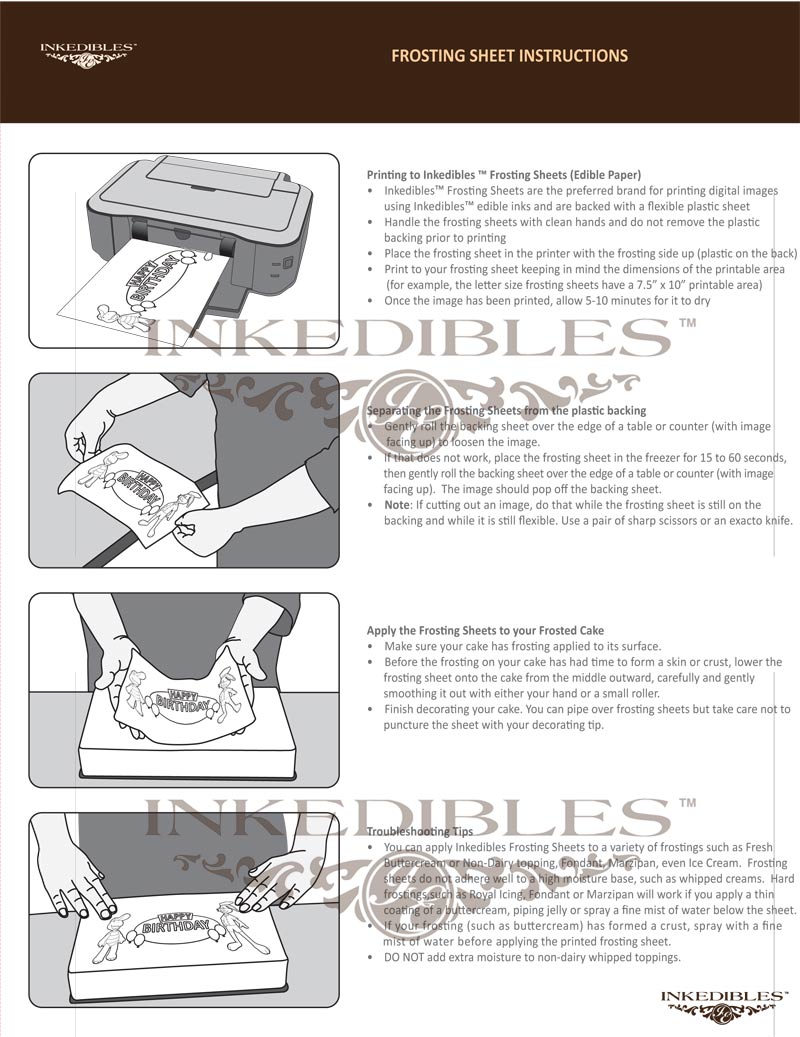
Frosting sheets are backed with plastic so that they slide through your printer
in much the same way that normal paper does, and they get printed to with
edible ink. Then the plastic backing is removed, and the frosting sheet aka
icing sheet is applied to a layer of frosting on top of the cake. See below
for instructions on how to print to your frosting sheets and apply them to
your cake.
(click to enlarge)
Frosting Sheets are available from Inkedibles in different shapes and sizes. The most common sheet frosting is the Inkedibles full sheet size (8.5 inch x 11 inch, or letter size). Inkedibles also offers other fun precut sizes as well, such as Precut 1.18 inch circles (48 circles per sheet), Precut 2.0 inch circles (15 circles per sheet), Precut 2.5 inch circles (12 circles per sheet), Precut 3.0 inch circles (6 circles per sheet), Precut 8 inch circles (1 circle per sheet) and Precut 2.5 inch x 3 inch rectangular cards (8 cards per page). These fun precut frosting sheets are commonly used as cupcake icing toppers, or for smaller / special size cake toppers. The precut frosting sheet sizes are easy to use - simply download and print using the free Inkedibles templates for each precut size (available in MS WORD).
The format size / backing for the Inkedibles frosting sheets is as follows:
- For the full sheet size, the backing is 8.5 x 11 inches.
- For the precut sizes, the backing is A4 size, and the downloadable templates are already preset to A4 paper size. You can verify the paper size before you print by opening the template in Microsoft Word, and selecting Page Layout --> Size and confirming it is set to A4 size before printing.
You can find the frosting sheet options and templates here:
Inkedibles Frosting
Sheets.
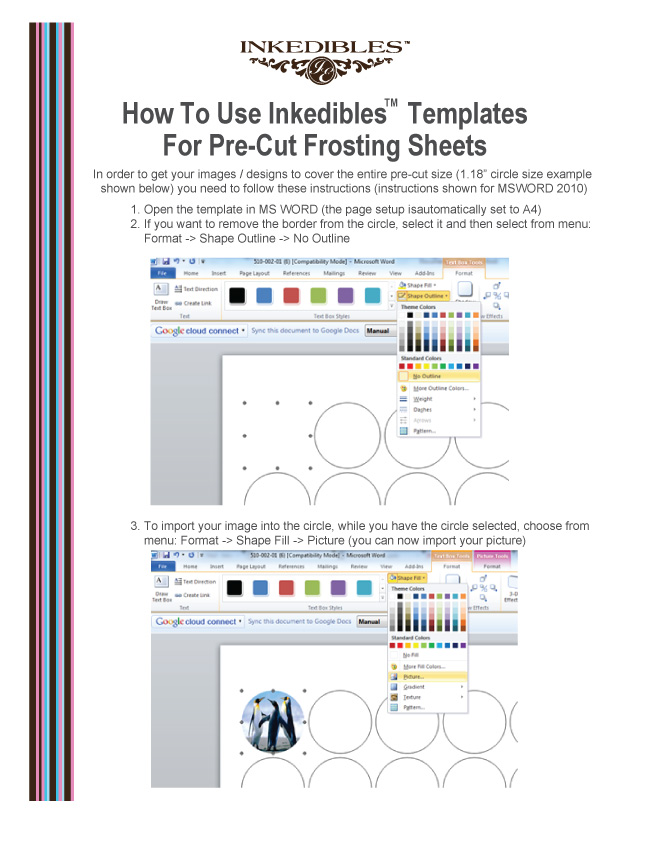
The frosting sheet templates are in Microsoft Word (MSWORD). Here are instructions
for how to use the templates in MS WORD in order to get your image/designs
to take the full shape of the precut size (circle, for example):
(click to enlarge)
6. How does edible ink printing work?
Think of printing a photo on your regular inkjet printer, then placing the
photo on a cake. That's how simple edible ink printing is and the process
is exactly the same. The only difference is that the ink is not regular ink,
it is edible ink (think of edible ink like colored, liquid frosting, that
is engineered to flow through your dedicated edible ink printer's printheads without causing any
disruptions to your printing setup), and the paper is also edible (the "paper"
is called a frosting sheet, which is a thin wafer of icing that flows through
your printer like paper would, and accepts the edible ink as it is printing
out). The final product (your digital image printed with edible ink onto your
frosting sheet) can be applied to a cake that has a layer of frosting on top
of it, and the frosting sheet adheres to the cake and looks like you have
printed directly to the cake! A great way to surprise your customers, friends
and family with beautiful and custom cakes printed with a regular inkjet printer!
CAUTION: DO NOT mix your edible ink printer or edible ink
cartridges with regular inks - you should dedicate an inkjet printer and edible
ink cartridges ONLY for edible ink printing so that you do not contaminate
the edible inks, and use food grade edible ink cartridges and food grade cleaning solution to clean and maintain.
7. What printers work with edible inks?
Most edible inks are designed
to work on inkjet printers manufactured by Canon or Epson. InkEdibles is not affiliated with the OEM printer brands, and the OEM warranties do not apply. Improper use of a printer for edible ink use can be a potential health hazard. Do not mix edible and regular inks in the same printer to prevent contamination. Only food grade edible ink cartridges and FDA compliant FDA edible ink should be used, and cleaning and maintenance should be performed with food grade solutions and procedures by InkEdibles.
8. Why choose the Inkedibles Brand?
Inkedibles ™ has spared
no costs to ensure that the inks we offer are of the highest quality inks
on the market for print quality, food safety, and printer compatability. We
hold our brand to the highest standard, and this is why we have been testing
and developing our line of products for many years before releasing them
on the market. We believe we have the best quality product on the market,
at a competitive price, and we stand behind our product 100%. If you are in
the cake decorating business, or if you are thinking of getting into the cake
decorating business, you will not be dissapointed by trying our products and
we are sure that you will be a regular customer. Give Inkedibles ™ a
try and let us earn your repeat business.
9. What is Direct to Food ™ Printing?
Direct to Food ™ printing is an innovative technology that bypasses the need for edible paper.
10. What are the best printer settings to use for
Inkedibles printing?
The intensity/brightness of colors printed using edible inks on edible paper
will be different to regular printing (for example, using original printer
inks and plain paper) because of the obvious differences in the print medium
and inks (edible paper and edible inks have different qualities to regular
ink and regular paper). Intensity/brightness of prints can be adjusted to
suit your needs through your printer’s “printing preferences”
tab. Examples of printer preference settings (shown in the instruction links)
are for the Canon ip3600 (a popular printer used in edible printing), but
all printer settings look and function similarly and you should consult your
printer manual if your menu options differ. To get the closest match with
minimal changes/effort, change the “paper type” and “print
quality” as per Page1 of the Inkedibles
Printer Settings Instruction sheet (link below). If those settings do
not give you the level of color brightness/intensity that you want, then go
ahead and make changes to color/intensity settings by clicking on the Manual
radio button and then Set the color/intensity by following Page2 of the Inkedibles
Printer Settings Instruction sheet. View the instructions by clicking
on the links below:
11. What are edible ink markers?
Edible ink markers are are both fun and practical to use! Adding a personal and creative touch to cookies, cakes or other food items is as simple as drawing your design to the food surface with these markers! And best of all... what you draw is perfectly edible! For best results, draw on foods which have a smooth, dry surface, such as: Iced Cookies | Marzipan | Donuts | Fondant | Hard Chocolate | Marshmallows | Bagels, Pita Bread Crackers or Wafers | Other smooth, dry foods
Ingredients of our Edible Ink Markers:
Purified water, propylene glycol, coloring (yellow #5 or #6, red #40 or #3, blue #1) and one or more of the following: sodium benzoate, citric acid, methyl paraben or propyl paraben as preservatives.
12. How does Chocolate Transfer work?
Create beautiful, signature chocolates and pralines with this new unique chocolate mold! Professional quality, 2 piece Magnetic Mold is constructed of food safe, clear, rigid polycarbonate. Detailed sharp corners produce professional chocolates!
First, you need to start with a chocolate transfer sheet that has your desired image or design. You can either print your own custom images onto Inkedibles Chocolate Transfer Sheets using a printer that is dedicated to using only edible inks (use Inkedibles Edible Inks and Inkedibles Transfer Sheets for consistent results), or you can use pre-printed transfer sheets such as those available from Inkedibles.
Depending on whether you will be using a chocolate mold (to make predesigned chocolate shapes, like circles, or hearts) or whether you will not be using a mold, your next steps are similar with exception of using a mold or not using a mold.
Click here to view our PDF instructions for:
Also view our YouTube videos below:
13. I have another question, how can I get support?
We have an extensive article list on our support forum, as well as live chat (available M-F 8am - 5pm PST). You can access the support forum at support.inkedibles.com